DeskButler

Keep your messy
Desktop & Downloads
clean and organized
always

40+ conditions, 10 actions, unlimited automation possibilities

Download on the Mac App Store

Available now on the Mac App Store

Powerful automation at your fingertips

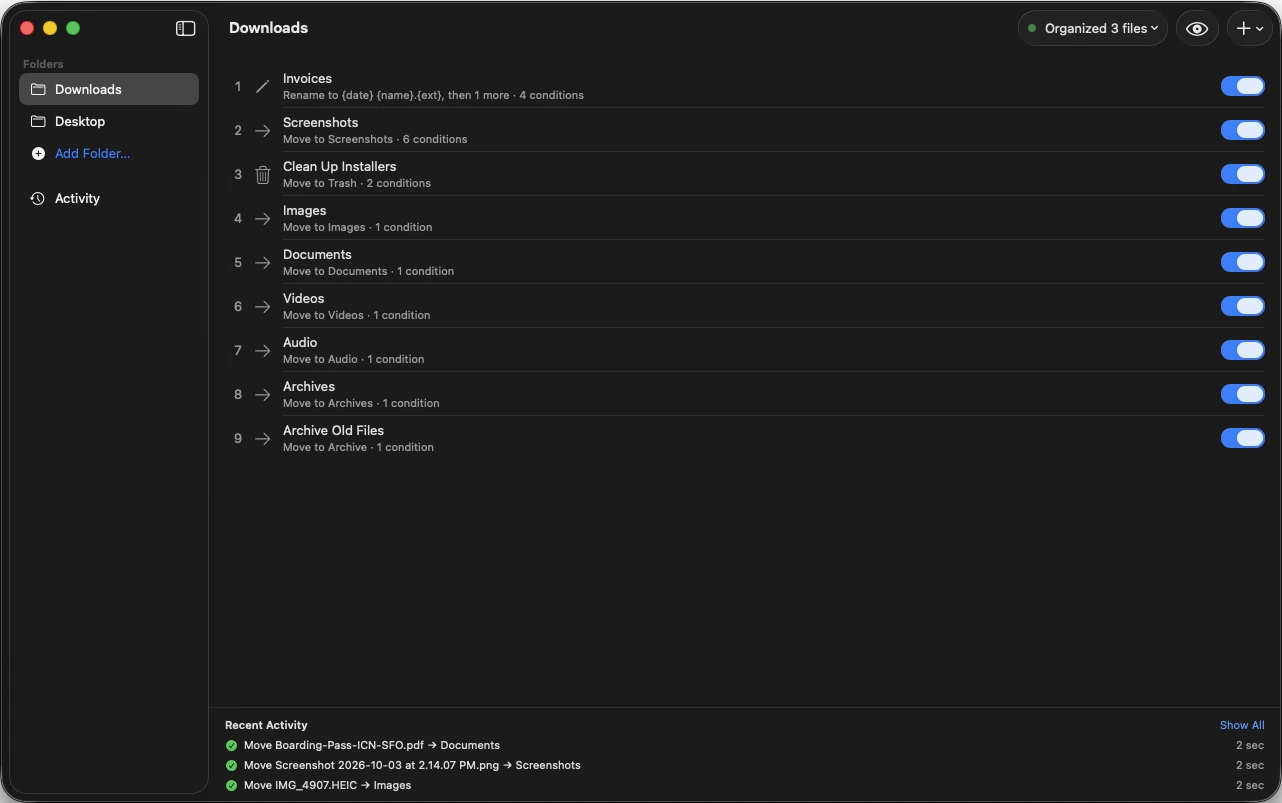
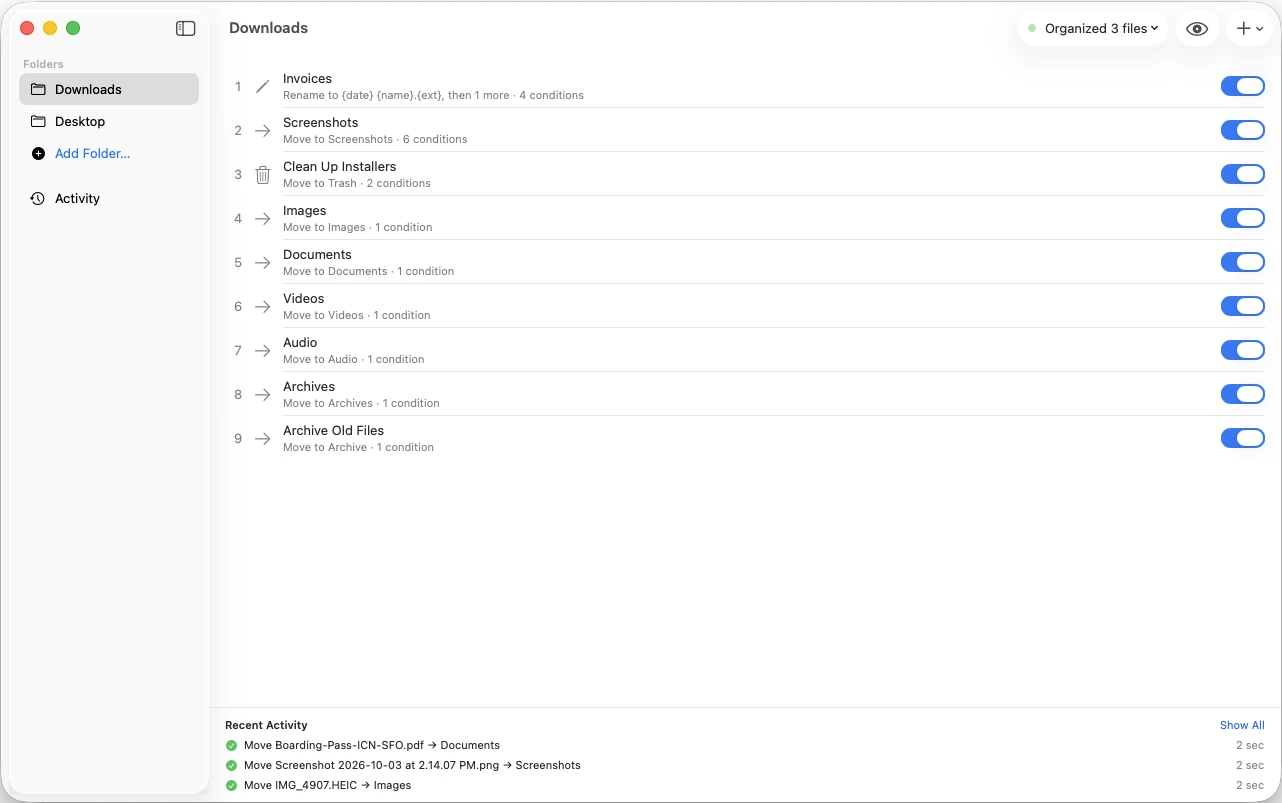
DeskButler Main Interface

RULE BUILDER

Name and organize
your automation

Give your rules meaningful names, set priorities, and activate them when ready. Simple, clean interface to manage your automations.

DeskButler Rule Basic Info
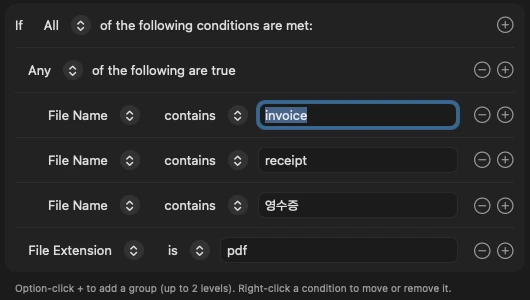
DeskButler Conditions Editor

CONDITIONS

40+ ways to
match your files

Build complex conditions with file extensions, sizes, dates, content, and more. Combine with AND, OR, NOT operators for unlimited precision.

ACTIONS

10 powerful
file operations

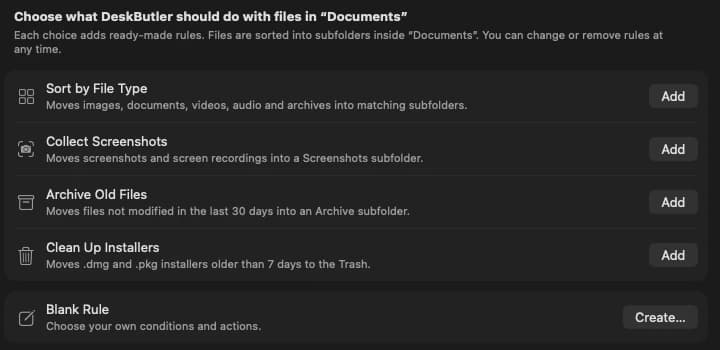
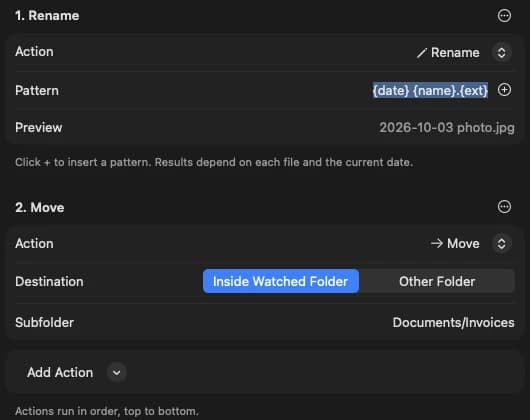
Move, copy, rename, compress, encrypt, and more. Chain multiple actions together to create sophisticated automation workflows.

DeskButler Actions Editor
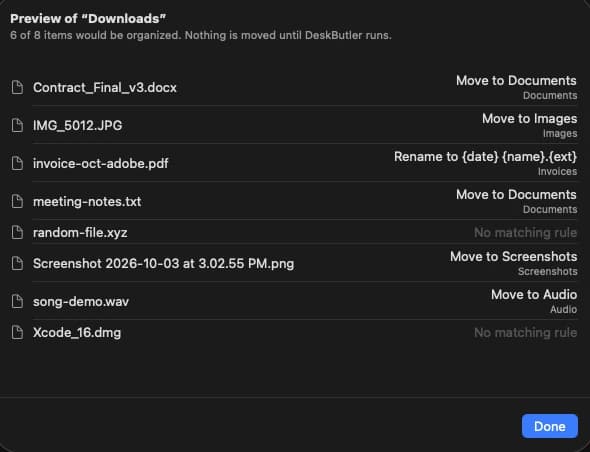
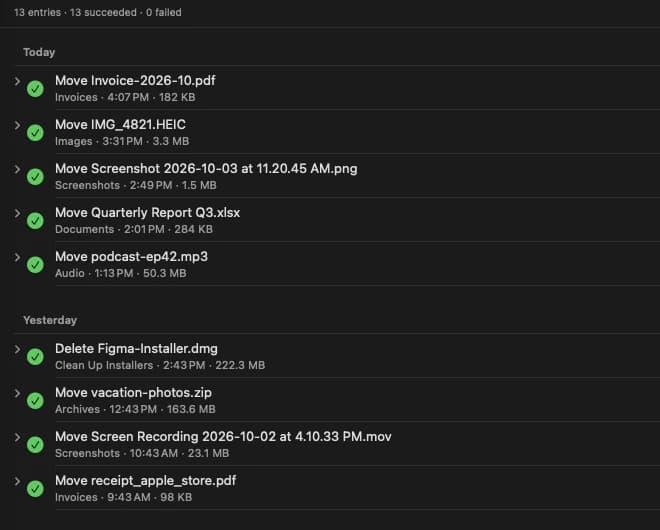
DeskButler History & Undo

SAFETY NET

One-click undo
for every action

Complete history tracking with instant rollback. Made a mistake? Click undo and your files are restored instantly. Automate with confidence.

β€œFile automation that actually makes sense”

Unprecedented power and flexibility

Build complex automation workflows with the most comprehensive rule system on macOS

40+

Condition Types

File properties, dates, content, media attributes, and more

10

File Actions

Move, copy, rename, compress, encrypt, and beyond

5s

Scan Interval

Real-time monitoring with configurable frequency

∞

Undo Support

Complete history tracking with one-click rollback

CONDITION SYSTEM

40+ ways to match files

Create precise rules with our comprehensive condition library

πŸ“„

Basic Properties

β€’ File extension & name

β€’ File size & size range

β€’ Full file name matching

β€’ File name length

πŸ“…

Date & Time

β€’ Created/Modified/Accessed dates

β€’ File age tracking

β€’ Day of week & time of day

β€’ Month & year filtering

πŸ“

Path & Location

β€’ File path patterns

β€’ Path depth checking

β€’ Parent folder name

β€’ Subfolder detection

πŸ”

Content Analysis

β€’ Text content searching

β€’ Line/word/character count

β€’ Regular expressions

β€’ File encoding detection

🎨

Media Attributes

β€’ Image dimensions & format

β€’ EXIF data checking

β€’ Video duration & bitrate

β€’ Audio sample rate

βš™οΈ

Advanced

β€’ File permissions checking

β€’ Directory size & file count

β€’ Symlink detection

β€’ Duplicate file detection

Plus: AND, OR, NOT operators for unlimited complexity

ACTION SYSTEM

10 powerful file operations

Every action you need to automate your workflow

πŸ“¦

Move

Relocate files

βœ“ Undo
πŸ“‹

Copy

Duplicate files

βœ“ Undo
✏️

Rename

Change names

βœ“ Undo
πŸ—‘οΈ

Delete

To trash

βœ— No Undo
πŸ“

Create Folder

New directories

βœ“ Undo
🏷️

Add Tags

macOS tags

βœ“ Undo
πŸ—œοΈ

Compress

ZIP only

βœ“ Undo
πŸ“¦

Extract

Decompress

βœ— No Undo
πŸ”

Encrypt

AES-256

βœ— No Undo
πŸ”“

Decrypt

Unlock files

βœ— No Undo
πŸ”—

Action Chaining

Combine multiple actions in sequence. Example: Move β†’ Rename β†’ Compress β†’ Tag. Each action passes its result to the next, creating powerful automated workflows.

SEE IT IN ACTION

Real automation examples

Downloads Organizer

Sort downloads by file type

Conditions:

β€’ File extension = pdf, doc, docx, txt

β€’ File size < 100MB

β€’ Created within 7 days

Actions:

1. Create folder: ~/Documents/Auto-Sorted

2. Move to: ~/Documents/Auto-Sorted

3. Add tag: "Auto-Organized"

Photo Archiver

Archive old photos by date

Conditions:

β€’ File extension = jpg, png, heic

β€’ Date created > 90 days ago

β€’ Has EXIF data

Actions:

1. Create folder: ~/Photos/Archive/{{year}/{{month}

2. Move to created folder

3. Compress as ZIP

Project Cleanup

Remove old build artifacts

Conditions:

β€’ File name contains: "build", "dist", ".cache"

β€’ Is in subfolder: true

β€’ Modified within 30 days = false

Actions:

1. Delete to trash

REAL-TIME MONITORING

Always watching, always organizing

Our intelligent scheduler runs in the background, keeping your files perfectly organized

⏱️

Configurable Interval

Default 5-second scan interval. Customize from 1 second to hours based on your needs.

🎯

Priority-Based

Rules execute in order: High β†’ Medium β†’ Low priority, ensuring critical tasks run first.

πŸ””

Smart Notifications

macOS Notification Center integration keeps you informed of all automation activity.

Scheduler Status

● Running

Scan Interval

5 seconds

Active Folders

3

Active Rules

12

Files Processed Today

847

Last Run

2 seconds ago

SAFETY FIRST

Automation with confidence

Complete history tracking and one-click undo means you can automate fearlessly

↩️

One-Click Undo

Made a mistake? Instantly revert any action with complete file restoration.

πŸ“‹

Complete History

Every action is logged with timestamps, before/after paths, and status.

πŸ—‘οΈ

Safe Deletion

Files are moved to trash, never permanently deleted. Always recoverable.

Security-Scoped Bookmarks

Built on Apple's security framework. Your folder permissions persist across app restarts, and you maintain complete control over what DeskButler can access.

TECHNOLOGY

Built with Apple's latest frameworks

Modern SwiftUI interface with rock-solid reliability

🎨

SwiftUI Interface

Beautiful, responsive UI that feels native to macOS with real-time updates.

⚑

Combine Framework

Reactive programming ensures instant UI updates and efficient data flow.

πŸ”

Sandboxed Security

Full App Sandbox compliance with Security-Scoped Bookmarks for safe file access.

πŸ’Ύ

Efficient Storage

JSON-based data persistence with automatic backups and version control.

πŸ””

Native Notifications

macOS Notification Center integration keeps you informed without interruption.

πŸ“Š

Comprehensive Logging

Detailed system logs with automatic 7-day retention for troubleshooting.

System Requirements

πŸ’»

Minimum Requirements

β€’ macOS 14.0 or later

β€’ 4GB RAM (8GB recommended)

β€’ 20MB available storage

β€’ Full Disk Access (recommended)

Stop organizing. Start automating.

40+ conditions, 10 actions, unlimited possibilities. Your files, perfectly organized, automatically.

Download on the Mac App Store

Available on Mac App Store